Start here
What MOSS is
Two apps on one engine. MOSS is where you talk to your bots; MOSS Code is where you run coding agents. This page says how they fit together, and what the first release holds.
MOSS is a desktop app where you talk to AI bots that do things for you on your computer. Its second app, MOSS Code, runs the coding agents you already use. Both run on macOS, Windows and Linux, on your own model accounts.
Not released yet. Everything on these pages describes the first release, which is still being built. Where something is not finished, the page says so.
Two apps#
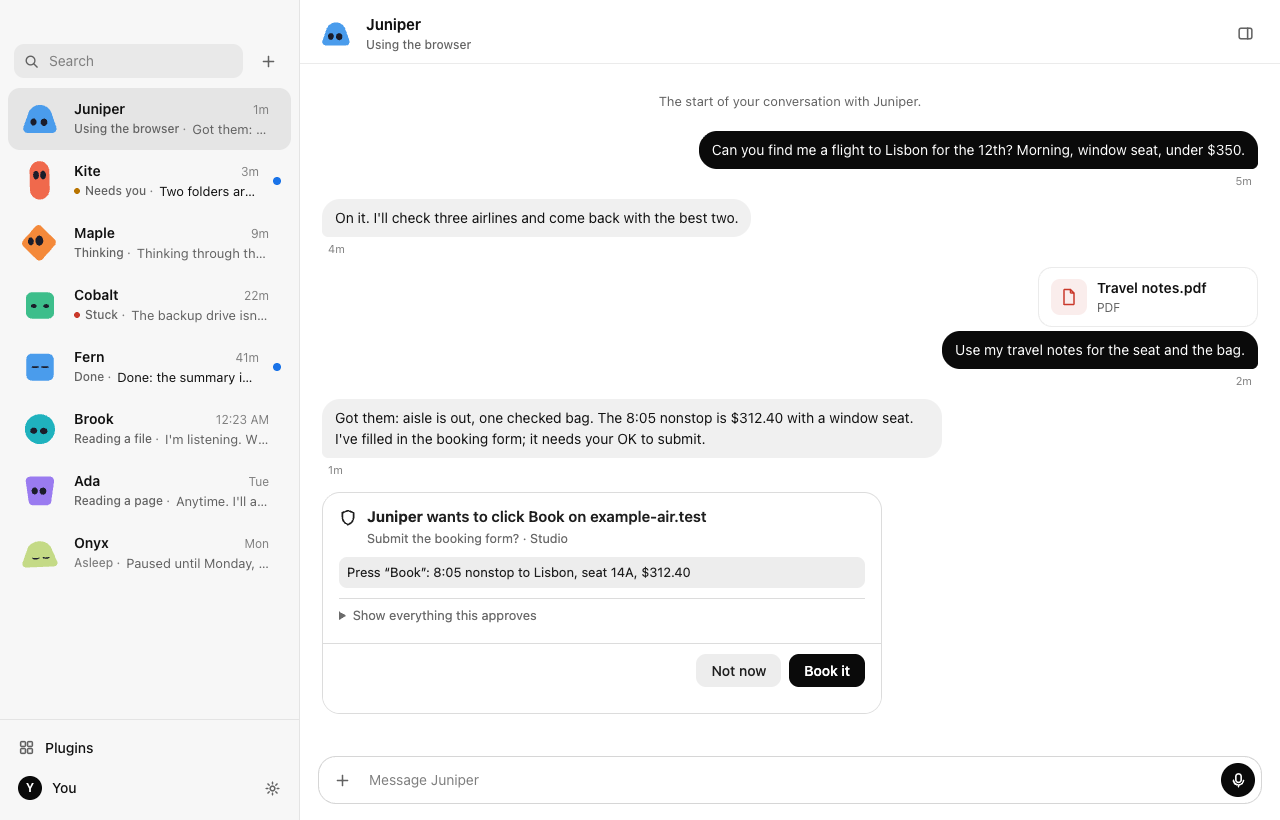
MOSS is the app for your bots. Its window is a list of bots on the left, one conversation in the middle, and a side panel you open for a bot's screen and its routines. It looks the same for everyone: plugins can give its bots new tools, models and voices, but they don't change its window.
MOSS Code is the app for coding. Each session is a coding agent you pick (Claude Code, Codex, OpenCode, MOSS's own and others), and its start page is a canvas of all your sessions side by side. Its window is made of plugins, so it can be restyled and rearranged.
You can install either one, or both. Each works on its own.
One engine#
Both apps are windows onto one engine, moss-core, which runs in the background from the moment you log in. The engine holds everything: your bots and their conversations, coding sessions, plugins and settings live in one folder, ~/.moss. Your keys are kept apart from it: in the Keychain on macOS, and on Windows and Linux in an encrypted file whose key your system's secret store keeps.
Because the engine does the work, closing a window stops nothing. Bots keep working, routines keep running, and when one needs you, its card still reaches you.
Each app carries a copy of the engine. With both installed, they share one.
Bots#
A bot is someone you talk to. Each has:
- A face, made from its name. The same name always makes the same face, and the face shows what the bot is doing: thinking, working, needing you, done, asleep.
- One conversation, which goes on as long as the bot does. Your message interrupts whatever it is doing.
- A memory, a folder of notes it keeps for itself.
- Routines, jobs it runs on a schedule or when something happens.
MOSS starts you with one bot, also called MOSS: the coral one. It is an ordinary bot, the first one you meet. You make the rest.
All bots are equal: every bot can use every tool you have installed for bots.
What a bot can do, and what it asks first#
A bot can read and change files, run commands in a sandbox, search the web and read pages, use a browser of its own in the background, run routines, message your other bots, and hand coding work to a coding agent.
What it does on its own depends on the level you set for each computer. At the default level, it works on its own inside its sandbox and your ordinary folders, and asks you on a card before deleting anything, buying anything, or doing something MOSS's safety check isn't sure about. Approval cards and levels has the details.
Your model, and what leaves your computer#
MOSS doesn't come with a model. You need an account or an API key with a model provider, or a model running on your own computer. Sign in to a subscription you already have, paste an API key from one of the many providers MOSS knows, or point it at a model server such as Ollama or LM Studio. The setup guide asks for one when you first open MOSS.
MOSS keeps your conversations, memory, settings and logs in ~/.moss, on your computer. What leaves it:
- Your model provider gets what you write and what a bot reads to answer you: files, pages, command output, pictures you attach. It goes with your own key or sign-in. A few background jobs use the same provider: titles, a safety check before commands, and, in MOSS Code, passes that read idle sessions to keep its memory and to clear away sessions with nothing worth keeping.
- Your voice provider, once you set a voice up with your own key, gets the replies to speak and what you say while you hold the talk button.
- Web searches go to Exa, a search company, and this is on from the start, with no account or key. Exa gets the words searched for and your IP address. There is no separate switch: to stop it, switch off the Web search and fetch plugin in MOSS Code, or with
moss plugin disable moss/webin a terminal. Pages a bot reads are fetched straight from your computer. - Updates come from the project's releases on GitHub. Both apps check when they start and every 4 hours, download a new version on their own, and install it when MOSS has nothing running. This can't be turned off. GitHub sees your IP address and the version you have.
- Paired devices find each other through a small WaifuCave service, learn their own network address from Cloudflare's and Google's public STUN servers, use n0's address lookup, and, when they can't connect directly, talk through a relay: n0's public relays, unless you choose your own. What passes between your devices is encrypted end to end; a relay still sees their IP addresses, which are online, and how much they send. While devices are linked they also ask Cloudflare's and Google's public time servers for the time.
- Webhook routines, a routine that starts when a service calls its webhook, get that call through a WaifuCave forwarder, which seals it for your computers on arrival and holds it at most 7 days.
- Downloads you OK on a card come from where the card says: Claude Code's and Codex's adapters from npm, a plugin from the address you gave it. A plugin can then reach what its card said it may.
MOSS has no analytics, no telemetry and no crash reports. You don't need an account: your devices pair with a code. What leaves your computer has each of these in full.
Plugins#
Almost everything outside the engine is a plugin: model providers, tools, voices, coding agents, routine triggers, and the parts of MOSS Code's window. A plugin is a folder of files. Nothing new runs until you say OK on a card that says what it may do. Write your first plugin shows one from the inside.
What the first release holds#
The first release brings both apps to macOS, Windows and Linux at the same time:
| System | Version | Chips |
|---|---|---|
| macOS | 27 or later | Apple silicon |
| Windows | 11 | x64 |
| Linux | Ubuntu 26.04 LTS, current Fedora | x64 and arm64 |
It includes pairing your computers so a bot can work on any of them.
MOSS is for people 13 and older.
Not in the first release:
- Controlling your screen. Clicking and typing in your apps comes later, as a plugin. A bot's own browser, which works in the background, is in.
- Taking over a bot's screen. In the first release you can watch it, not drive it.
- Bots together in one conversation. Each conversation is you and one bot; bots work together by messaging each other.
- The phone apps. MOSS and MOSS Code for iPhone and Android are being built now, on their own schedule: the desktop release doesn't wait for them.